-
Shop
- Adidas
- Advanced Technologies
- Apple Accessories
- Armani Fashion
- Arts, Crafts & Hobbies
- Best-Sellers
- Calvin Klein Fashion
- Car Accessories
- Dating & Social Skills
- Drones
- Education & Learning
- Electronics
- Emotional Intelligence
- Family & Parenting
- Fashion
- Alexander McQueen Fashion
- Bags
- Bags & Wallets
- Balenciaga Fashion
- Belts
- Blazers
- Blouses & Shirts
- Bottega Veneta Fashion
- Bottoms
- Brunello Cucinelli Fashion
- Burberry Fashion
- Chanel Fashion
- Chloé Fashion
- Dior Fashion
- Dolce & Gabbana Fashion
- Dresses
- Etro Fashion
- Fendi Fashion
- Gucci Fashion
- Hats & Hair Accessories
- Hoodies & Sweatshirts
- Jacquemus Fashion
- Jewelry
- Jil Sander Fashion
- Jimmy Choo Fashion
- Kiton Fashion
- Luggage
- Luggage Bags
- Men's Fashion
- Miu Miu Fashion
- Off-White Fashion
- Outerwear
- Prada Fashion
- Rick Owens Fashion
- Saint Laurent Fashion
- Scarves
- Shoes
- Skirts
- Socks & Tights
- Sunglasses
- Sweaters & Cardigans
- The Row Fashion
- Tom Ford Fashion
- Tops & Shirts
- Trousers
- Valentino fashion
- Valentino Garavani Fashion
- Versace Fashion
- Vivienne Westwood fashion
- Watches
- Fashion Accessories
- Gadgets
- Gift Ideas
- Gifts
- Guess Fashion
- Health & Beauty
- Health & Wellness
- Home & Garden
- Home Supplies
- Kids & Babies
- Massagers
- Mindset
- Nike Fashion
- Patio, Lawn & Garden
- Personal Growth
- Pet Care
- Pet Supplies
- Pets
- Productivity
- Samsung Accessories
- Sport
- Sport & Outdoors
- Summer 2025 Fashion Collection
- Super Deals
- Tesla Accessories
- Tommy Hilfiger Fashion
- Travel
- Travel & Outdoors
- Video Games
- Wealth
Wired Mechanical Gaming Keyboard Guide: Switches & Speed
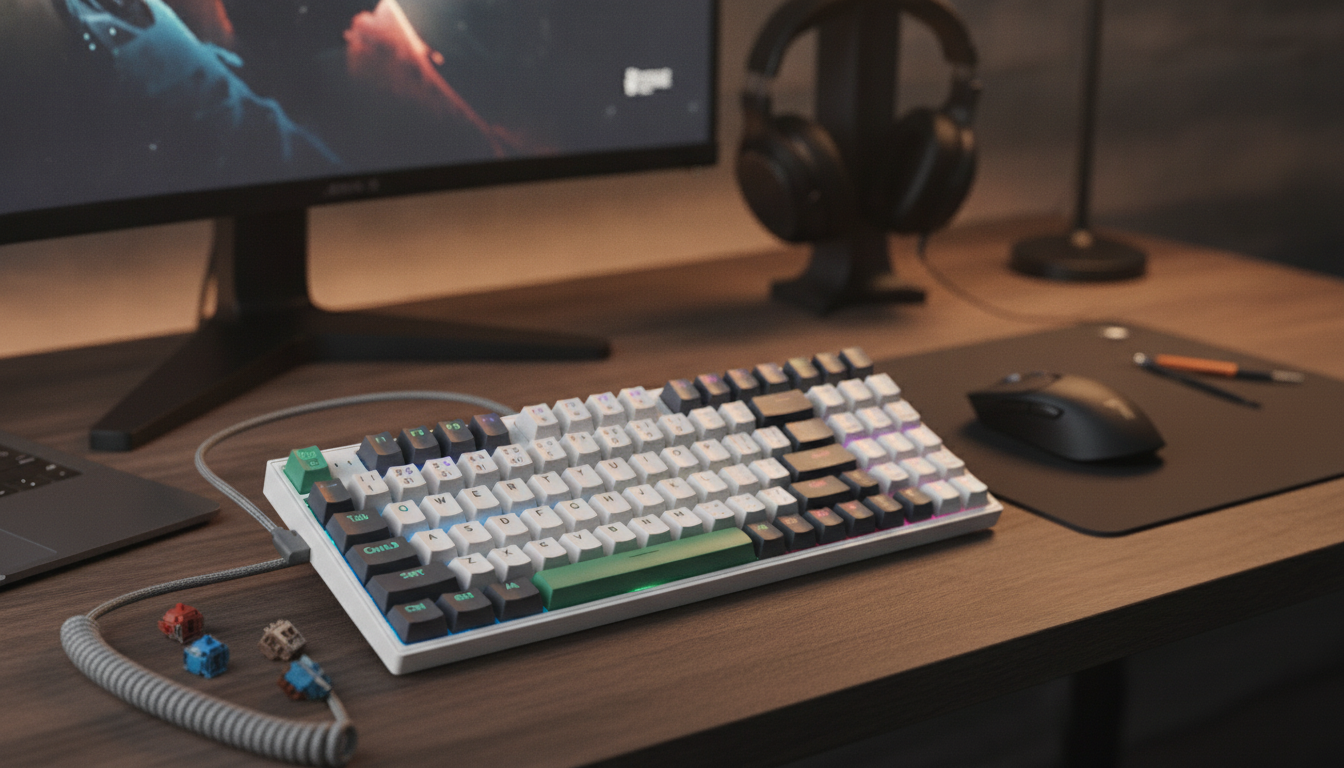
Wired Mechanical Gaming Keyboard: Fast Inputs, Solid Feel, No Battery Worries
A wired mechanical gaming keyboard is built for consistent performance: stable power, low-latency input, and the tactile feedback many players prefer. Whether you’re grinding ranked matches or typing for hours, a mechanical board can feel more precise and predictable than a typical membrane keyboard. Below is a practical guide to what changes with mechanical switches, why wired still makes sense for many desks, which features actually affect gameplay, and how to keep your setup clean and reliable.
At a Glance
- Mechanical switches provide a distinct feel and consistent keypress behavior compared with typical membrane boards.
- A wired connection avoids wireless interference and removes charging/battery management from the equation.
- Look for features that impact real play: rollover/anti-ghosting, a stable chassis, and comfortable keycap profiles.
- Price point for the featured option: $79.65 (in stock).
What “Mechanical” Changes in Daily Use
“Mechanical” means each key has its own physical switch mechanism. Instead of pressing a rubber dome onto a membrane sheet, you’re actuating an individual switch designed to repeat the same way, press after press. That design is a big reason mechanical keyboards are often described as more consistent over time—especially for people who alternate between rapid movement keys and frequent ability taps.
- Switch mechanism: each key uses an individual switch, which can improve consistency and long-term feel.
- Feedback options: some switches emphasize an audible click, others a tactile bump, others a smooth linear press.
- Key reset behavior: many gamers prefer how mechanical switches return quickly for repeated inputs.
- Sound and feel: depend heavily on switch type, keycaps, stabilizers, and the keyboard’s case design.
Common Switch Feel Profiles (General Guide)
| Switch feel | Typical sound | Why gamers choose it | What to watch for |
|---|---|---|---|
| Linear | Quieter (usually) | Smooth rapid presses for movement and repeated actions | Can feel easier to mis-press without a tactile cue |
| Tactile | Moderate | Noticeable feedback without a loud click | Some prefer lighter or stronger tactile bumps |
| Clicky | Loud | Crisp feedback for deliberate presses | Noise may be distracting in shared spaces or on voice chat |
For a deeper look at how popular switch families are categorized, CHERRY’s switch characteristics overview is a useful reference: CHERRY MX Switches (Switch Characteristics Overview).
Why a Wired Connection Still Wins for Many Setups
Wireless keyboards have improved a lot, but wired remains the simplest path to consistency. With a cable, there’s no pairing step, no radio environment to worry about, and no battery to monitor mid-session. For players who just want their board to work every single time, wired is a straightforward advantage.
- Consistent connection: no radio interference, pairing issues, or battery-related dropouts.
- Stable power: lighting and onboard features can run without worrying about battery drain.
- Plug-and-play convenience: many wired keyboards work immediately via standard USB HID support.
- Tournament and LAN friendliness: wired gear is often simpler to manage and troubleshoot quickly.
If you’re curious why most keyboards “just work” when plugged in, that behavior is tied to USB HID standards: USB Human Interface Device (HID) Class.
Gaming Performance Features That Matter
Specs can get noisy fast, so it helps to focus on what changes your experience in real matches. A good gaming keyboard should reliably register complex inputs, stay stable during aggressive movement, and feel predictable on your most-used keys.
- Rollover and anti-ghosting: helps ensure multiple simultaneous keypresses register as intended during complex inputs.
- Polling rate (where supported): higher reporting frequency can reduce input delay on some systems.
- Stabilized large keys: spacebar, Enter, and Shift feel steadier when stabilizers are well-tuned.
- Layout and size: full-size, TKL, and compact boards affect mouse space, ergonomics, and shortcut access.
Layout is an underrated decision. A compact or tenkeyless board can free up mouse room for lower-sensitivity aim, while a full-size layout can be more convenient for productivity and games that rely on the numpad or extra navigation keys.
Comfort, Build, and Desk Setup
A keyboard can be “fast” on paper and still feel tiring if the caps are slippery, the case flexes, or the cable constantly snags. Comfort and build quality tend to show up after a few long sessions—exactly when you want your setup to disappear and let you focus.
Setup and Compatibility Basics
Featured Product
The Wired Mechanical Gaming Keyboard is a straightforward wired option for players who want mechanical key feel and a dependable connection—without adding battery management to the routine. For the exact switch type, lighting options, and layout details, confirm the specifications on the product page before ordering.
Purchase Details
| Item | Price | Availability | Link |
|---|---|---|---|
| Wired Mechanical Gaming Keyboard | 79.65 USD | In stock | View product |
Desk Comfort Picks (In Stock)
FAQ
Is a wired mechanical keyboard faster than wireless for gaming?
Wired keyboards typically deliver the most consistent connection because they avoid wireless interference and battery-related behavior. Real-world responsiveness also depends on the keyboard’s internal electronics and your system, but wired is usually the simplest setup to trust and troubleshoot.
What switch type is best for gaming: linear, tactile, or clicky?
Linear switches are popular for smooth, fast repeated presses; tactile switches add feedback without being as loud as clicky options; clicky switches provide strong confirmation but can be noisy. The best choice depends on preferred feel, noise tolerance, and the kinds of games you play most.
What do anti-ghosting and rollover mean?
Ghosting happens when multiple simultaneous keypresses cause some inputs not to register correctly. Rollover describes how many keys can be pressed at once while still registering accurately (for example, 6KRO or NKRO), which helps during complex movement and ability combinations.
Recommended for you

Was this article helpful?
Yes
No









Leave a comment